 Login
LoginTeleprompter Meaning: What Is a Teleprompter and How Does It Work?

Maya Chen
8/25/2026

On this page
A teleprompter is a device or software tool that displays a script while a person speaks. It helps presenters, creators, teachers, journalists, and speakers follow prepared content while maintaining natural eye contact with a camera or audience.
In simple terms, the teleprompter meaning is a visual prompting system that allows someone to read prepared words while speaking. Traditional systems use reflective glass and a display, while modern software can show scrolling text on a phone, tablet, or computer.
So, what exactly is a teleprompter, how does it work, what does it look like, and when should you use one? This guide covers the basics and practical uses.
What Is a Teleprompter?
A teleprompter displays written text in front of a person who is speaking. The script usually scrolls at a controlled speed so the speaker can follow it without constantly looking down at notes.
The basic idea is simple: instead of memorizing every sentence, the speaker follows a prepared script while delivering the content naturally.
Teleprompters are commonly used for:
- Television news
- Public speeches
- Business presentations
- YouTube videos
- Online courses
- Corporate announcements
- Live streams
- Interviews
- Product demonstrations
- Social media videos
Teleprompters are also called autocues, especially in the United Kingdom and some other regions. The name may vary, but the purpose is the same: help a person deliver prepared content while keeping a natural line of sight.
Unlike printed notes or cue cards, a teleprompter keeps the script close to the speaker's normal viewing position. This makes it easier to maintain eye contact and stay focused on delivery.
Teleprompter Meaning and Definition
The teleprompter definition is a device or software system that presents scrolling text to a person while they are speaking.
To define teleprompter in simple terms, it is a tool that helps someone speak from a prepared script without memorizing the entire text.
The meaning of teleprompter can refer to both traditional hardware and modern software. A professional broadcast setup might use a camera-mounted glass system, while a content creator might use an online teleprompter in a web browser.
Today, a teleprompter may be:
- A camera-mounted prompting system
- A podium teleprompter
- A confidence monitor
- A tablet-based teleprompter
- A smartphone teleprompter
- A desktop teleprompter
- An online teleprompter
How Does a Teleprompter Work?
One of the most common questions is how does a teleprompter work?
A traditional camera-mounted system usually includes four basic parts:
- A monitor that displays the script
- A beam-splitter glass panel
- A camera positioned behind the glass
- Software or a controller that moves the text
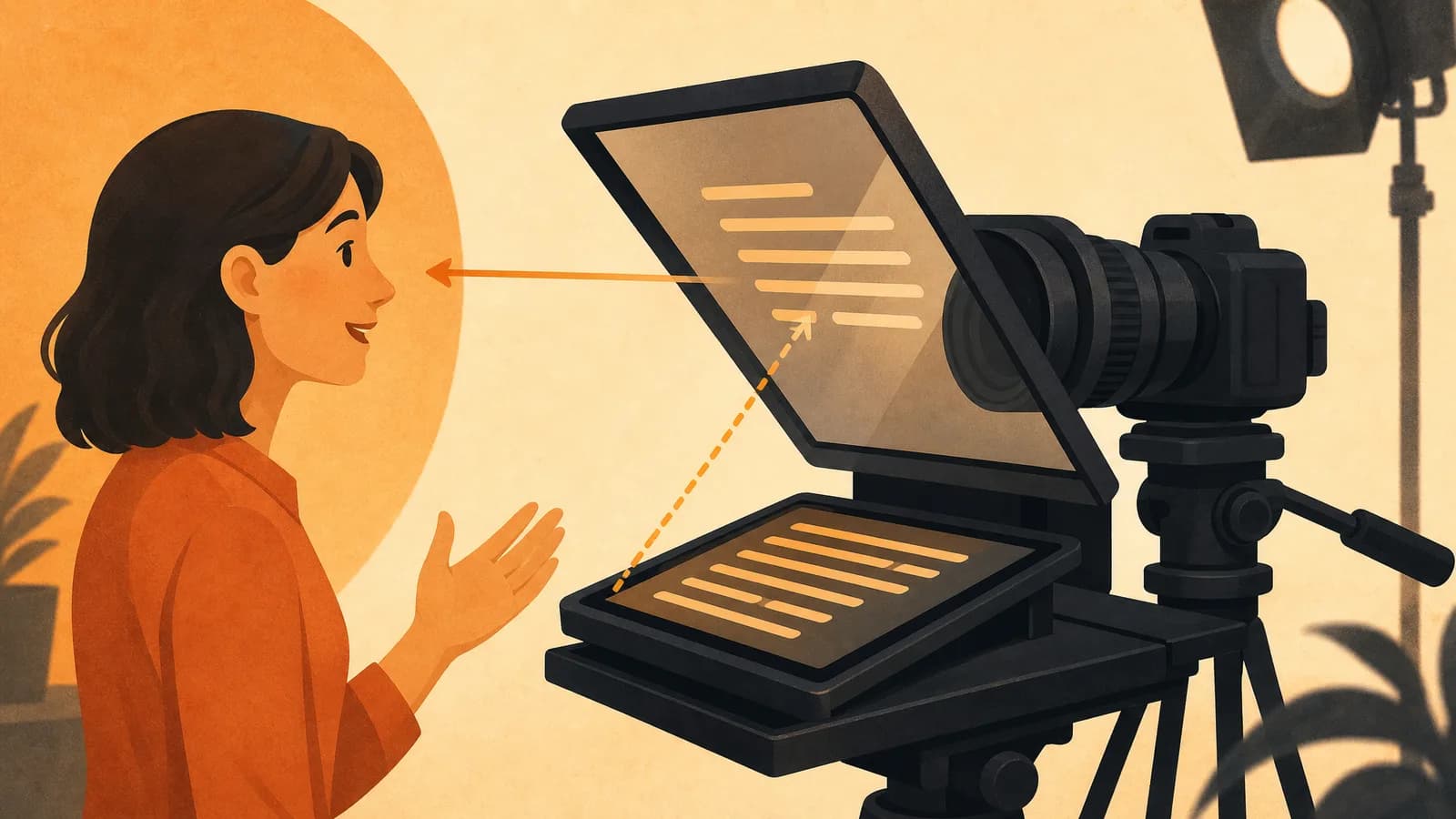
The monitor displays the script toward the angled glass. The glass reflects the text toward the speaker while allowing the camera to capture the person through the transparent panel.
This lets the speaker read the words while appearing to look directly at the camera.
How Do Teleprompters Work With Reflected Text?
When people ask how do teleprompters work, the key is the relationship between the display, reflective glass, and camera.
The script is displayed so the angled glass can reflect it toward the speaker. The camera remains behind the glass and records the speaker normally.
The text is typically mirrored before reflection so that it appears correctly to the person reading it.
How Does Teleprompter Software Work?
Modern software makes the process much simpler.
An online teleprompter can display scrolling text directly on a computer, tablet, or smartphone. Users can usually control:
- Scrolling speed
- Font size
- Text spacing
- Screen position
- Script layout
- Playback controls
- Pause and resume
For many creators, this removes the need for dedicated teleprompter hardware.
What Does a Teleprompter Look Like?
What does a teleprompter look like? That depends on the type.
A traditional camera-mounted system usually looks like a hood or frame attached to the front of a camera. A transparent glass panel sits at an angle in front of the camera lens, while a monitor behind the glass displays the script.
Other systems can look very different.
Camera-Mounted Teleprompter
A camera-mounted teleprompter is built around the camera lens. Because the script appears close to the lens, the speaker can read while maintaining a natural eye line.
Podium Teleprompter
A podium teleprompter usually uses one or two glass panels positioned near a speaker. It is commonly used for speeches, formal presentations, conferences, and large events.
Floor or Confidence Monitor
A confidence monitor is a display placed below or near the camera. It allows the speaker to read from farther away without using traditional reflective glass.
Tablet Teleprompter
A tablet teleprompter uses a tablet as the script display, often together with a reflective panel. It is smaller and more portable than many professional systems.
Software Teleprompter
A software teleprompter may look like a simple scrolling text window on a phone, tablet, or computer. It is a practical option for creators and presenters who do not need professional studio equipment.
What Does a Teleprompter Look Like to the Speaker?
From the speaker's perspective, the script appears as readable text close to the natural line of sight.
Instead of looking down at printed notes, the speaker can follow the words while keeping their eyes near the camera or audience.
A good setup should make the text easy to follow without requiring large head or eye movements.
What Are the Main Types of Teleprompters?
There are several types of teleprompters, each suited to a different environment.
Camera-Mounted Teleprompters
These attach directly to a camera and are common in studios, interviews, video production, and online content.
Podium Teleprompters
These use angled glass panels positioned near a speaker. They are often used for speeches, conferences, ceremonies, and formal events.
Floor or Confidence Monitors
These display scripts on a separate screen near the stage or camera. They offer more flexibility for speakers who need to move around.
Tablet Teleprompters
These combine a tablet with a compact prompting setup. They are portable and useful for creators, teachers, and small production teams.
Software and Online Teleprompters
These display the script directly on a phone, tablet, or computer. They are convenient for people recording videos, practicing speeches, or presenting without specialized hardware.
What Is a Teleprompter Used For?
A teleprompter is used whenever someone needs to deliver prepared information clearly and consistently.
News and Broadcasting
News presenters use teleprompters to follow prepared scripts while looking toward the camera. This helps keep delivery organized and consistent.
Video Recording
Creators use teleprompters for tutorials, reviews, interviews, product demonstrations, educational videos, and social media content.
A script can reduce forgotten points, long pauses, and unnecessary retakes.
Speeches and Presentations
Speakers can use them for conferences, ceremonies, business presentations, public speaking, and other formal events.
Live Streaming
Livestream hosts can use a teleprompter for introductions, talking points, announcements, product information, and transitions.
Online Courses
Teachers and instructors can follow prepared lessons while keeping the presentation organized and consistent across multiple recordings.
Why Use a Teleprompter?
A teleprompter can provide several practical benefits.
Maintain Better Eye Contact
Printed notes often force the speaker to look down. A teleprompter keeps the script closer to the camera or audience.
Reduce Forgotten Lines
The script provides a visible reference throughout a presentation or recording.
Reduce Retakes
When speakers can follow the script more easily, they may spend less time stopping and restarting.
Improve Consistency
A prepared script helps ensure that important names, numbers, product details, instructions, and key messages are delivered consistently.
Increase Confidence
A teleprompter does not replace preparation, but knowing the script is available can make longer recordings and presentations feel easier.
How to Use a Teleprompter
Learning how to use a teleprompter is straightforward.
Write a Natural Script
Write the way you speak. Short sentences and simple transitions are easier to read than long formal paragraphs.
Load the Script
Paste or upload the script into your teleprompter software.
Place the Screen Near the Camera
For video recording, place the display as close to the camera lens as practical. This helps maintain a natural eye line.
Adjust the Text Size
Choose a font size that you can read comfortably without squinting or moving your head.
Set the Scrolling Speed
Start slowly and increase the speed until it matches your natural speaking pace.
Mark Pauses and Emphasis
Use line breaks, punctuation, and simple formatting to show where to pause or emphasize an important point.
Practice Before Recording
Read through the script before the final recording. This helps identify awkward wording and fine-tune the scrolling speed.
Speak Naturally
Do not focus on mechanically reading every word. Follow the script while maintaining a conversational tone.
How to Set Up a Teleprompter
How to set up a teleprompter depends on the type of system you use.
For a traditional teleprompter:
- Mount the teleprompter to the camera.
- Position the reflective glass correctly.
- Place the script display behind the glass.
- Connect the controller or software.
- Load the script.
- Test the viewing angle and scrolling speed.
For an online teleprompter, setup is much simpler:
- Open the tool in a browser.
- Paste or write your script.
- Adjust the text size and scrolling speed.
- Place the screen near the camera.
- Start the script.
- Begin recording or presenting.
How to Record a Video With a Teleprompter
Knowing how to record a video with a teleprompter can make scripted videos easier to produce.
Start by placing the teleprompter screen close to the camera. Load your script and choose a comfortable text size. Run through the script once to find a natural scrolling speed.
During recording, keep your eyes near the camera and speak naturally. Avoid rushing just because the text is moving.
For longer videos, divide the script into short sections. This makes it easier to pause, restart, or edit individual parts.
You can also record with the script on screen in the same browser tab.
Common Teleprompter Mistakes
Writing Like an Essay
Written language often sounds different from spoken language. Rewrite long or formal sentences so they sound natural when spoken.
Scrolling Too Quickly
A fast scrolling speed can cause you to rush, skip words, or lose your place.
Using Too Much Text
Large blocks of text are harder to scan. Break the script into short, readable sections.
Looking Only at the Script
The goal is to communicate with the audience, not simply read words. Use natural expressions and vary your tone.
Skipping a Technical Test
Before recording, check the camera position, text visibility, scroll direction, font size, and script timing.
Hardware Teleprompter vs. Online Teleprompter
| Feature | Hardware Teleprompter | Online Teleprompter |
|---|---|---|
| Setup | Requires dedicated equipment | Runs on a browser or device |
| Portability | Depends on the system | Easy to move between devices |
| Camera placement | Usually built around the camera lens | Screen needs to be positioned near the camera |
| Cost | May require additional hardware | Usually simpler to get started |
| Best for | Studios and professional productions | Creators, speakers, teachers, and everyday recording |
Hardware systems are useful for professional studios and broadcast environments where camera alignment and reflective glass are important.
An online teleprompter can be more practical for individual creators, teachers, presenters, and small teams who want to get started without buying specialized equipment.
Can You Use a Teleprompter Without Special Equipment?
Yes. You do not necessarily need a professional camera-mounted system.
A phone, tablet, laptop, or computer can be used with software or an online teleprompter.
A simple setup is:
- Open an online teleprompter.
- Add your script.
- Adjust the text size.
- Set the scrolling speed.
- Place the screen near the camera.
- Start recording.
This approach can work well for short videos, tutorials, presentations, announcements, speeches, and practice sessions.

Frequently Asked Questions
What Is the Teleprompter Definition?
A teleprompter is a device or software system that displays a scrolling script for a person to read while speaking.
What Is a Teleprompter Used For?
It is used for news broadcasts, speeches, presentations, videos, live streams, online courses, interviews, and other situations where prepared content needs to be delivered clearly.
How Do Teleprompters Work?
Traditional systems use a monitor and angled reflective glass to display text in front of the speaker while allowing the camera to record through the glass. Software systems can display the script directly on a phone, tablet, or computer.
What Does a Teleprompter Look Like?
A traditional teleprompter usually includes a display, transparent reflective glass, and a camera positioned behind the glass. Software versions may simply look like scrolling text on a screen.
What Does a Teleprompter Look Like to the Speaker?
The script appears as readable text close to the speaker's natural line of sight, usually in front of the camera or near the speaking area.
How Do You Set Up a Teleprompter?
Place the display near the camera, load the script, adjust the font size and scrolling speed, position the equipment correctly, and test the setup before recording.
Can Beginners Use a Teleprompter?
Yes. Beginners can use an online or software teleprompter to follow scripts while recording videos, practicing speeches, teaching lessons, or presenting information.
Final Takeaway
The teleprompter meaning is simple: a teleprompter is a tool that displays a script while someone speaks.
Traditional systems use reflective glass and a display, while modern online teleprompters can run on phones, tablets, and computers.
Whether you are recording a video, presenting a speech, teaching an online course, hosting a live stream, or reading the news, a teleprompter can help you stay organized, maintain eye contact, and deliver your message with greater confidence.
For creators and presenters who do not need professional broadcast hardware, an online teleprompter can be a convenient option. Load your script, adjust the scrolling speed, place the screen near your camera, and start speaking.